Which skill do I need?
Each skill is shown as a 3D pipeline: what goes in, the steps the agent takes, and what comes out. Pick a skill to watch it run, then read its pros and cons before you install it.
- Grey block: an item
- Green: passed or matched
- Red: failed, or a risk
- Amber: flagged for a look
- Blue: the first or a recalled item
- Coloured block: its group
- Orange loop: a cycle
- Teal cylinder: memory
- Frame: one chunk
Drag to turn the view. Click a step to jump to it. The blocks are the items. They move and change colour at each step, so you can follow one item through the skill. The dashed line marks a boundary, and a frame marks a chunk.
How to install
Two steps. Install the extension once, then install the skills into each project that uses them.
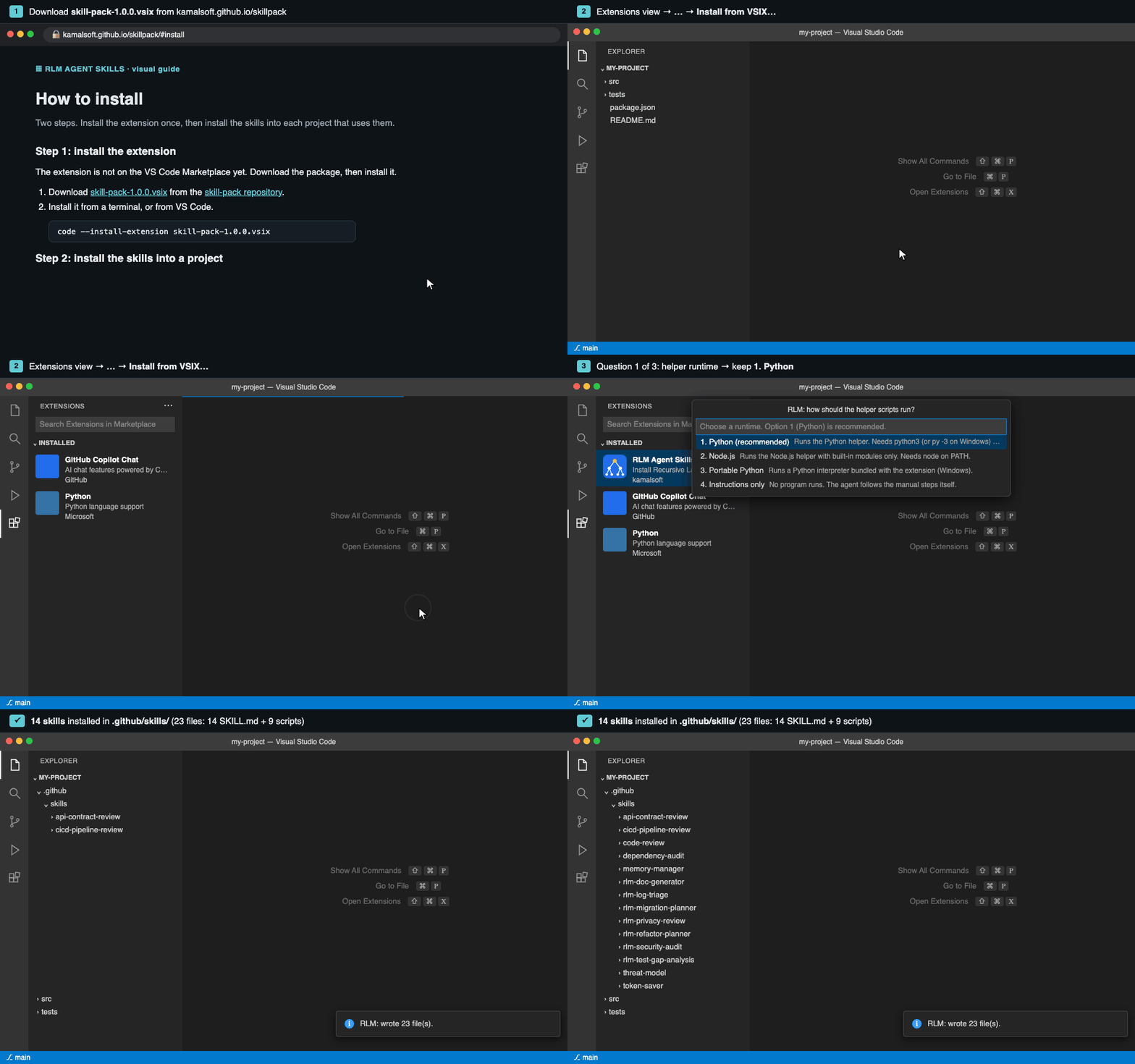
Step 1: install the extension
The extension is not on the VS Code Marketplace yet. Download the package, then install it.
- Download skill-pack-1.0.0.vsix from the skill-pack repository.
- Install it from a terminal, or from VS Code.
In VS Code, open the Extensions view (⇧⌘X), choose Install from VSIX… from the … menu, select the file, and reload if asked.
code --install-extension skill-pack-1.0.0.vsix
Step 2: install the skills into a project
- Open the project as a folder (File > Open Folder), not a single file.
- Run RLM: Install Agent Skills from the Command Palette (⇧⌘P on macOS, Ctrl+Shift+P on Windows).
- Answer the three questions.
| Question | Default | What to choose |
|---|---|---|
| How should the helper scripts run? | 1. Python | 1 if Python 3 is installed. 2 if only Node.js is installed. 4 if programs may not run. Option 3 is listed, but it does not work in the standard package (see the note below). |
| Where should the skills go? | GitHub Copilot | Every agent you use. You can pick more than one. |
| Which skills should be installed? | Fourteen selected | Keep the defaults, or tick the off ones you need (the three compliance skills, release-notes, stack-auditor, trust-layer-validator, incident-postmortem). |
.vsix leaves it out. Choosing option 3 stops the install with the message “the portable Python runtime is not bundled in this build”. Choose option 1, 2 or 4 instead. Developers can bundle it by running node scripts/fetch-portable-python.mjs in the source repository and rebuilding the package. It has been prepared for Windows, but not tested there.- Wait for the message RLM: wrote N file(s). If it says some files were left unchanged, those were files you had edited.
Where each agent reads its skills
| Agent | Skills folder in your project |
|---|---|
| GitHub Copilot (default) | .github/skills/ |
| Claude Code | .claude/skills/ |
| OpenAI Codex | .agents/skills/ |
| Cursor | .cursor/skills/ |
| Gemini CLI | .gemini/skills/ |
| Windsurf | .windsurf/skills/ |
Step 3: check the install
- GitHub Copilot: open Copilot Chat and type
/skills. Therlm-*skills should be listed. - Claude Code: the skills are in
.claude/skills/. Name a skill in your request.
Then ask your agent in plain words, naming the skill:
Use the rlm-security-audit skill on src/. Report findings with file and line.Update, remove, or get the source
- Update: run RLM: Install Agent Skills again. Files you have edited are left alone.
- Remove: delete the skill folders in the agent's folder. The extension never deletes anything.
- Clone the package repository:
git clone https://github.com/kamalsoft/skill-pack.git
More
Questions
Does it need an API key?
No. The extension makes no model calls. The agent you use sends the code it reads to its own model provider, under your subscription.
Does it change my code?
It writes skill files into the agent folders in your project. It never deletes anything, and files you have edited are left alone.
Where is memory stored?
In .agent-memory/graph.json in the project. Add .agent-memory/ to .gitignore if the project uses git.
Why is Portable Python listed but not working?
It is listed in the install picker, but the standard package does not include the interpreter, because it adds about 22 MB. Choose Python 3, Node.js, or instructions only. See the note in the install section.
Is it on the Marketplace?
Not yet. Install it from the .vsix file.
Before you rely on the output
- The skills are a technical aid. They are not legal, security, privacy, compliance or audit advice.
- Agents can miss real problems and report problems that do not exist. Check every finding against the source.
- Compliance skills report whether evidence is present. They do not certify compliance.
- The agent sends the code it reads to its model provider. Do not use the skills on material you may not send there.
- The software is provided as is, without warranty, under the MIT licence.
About the author
RLM Agent Skills is built and maintained by Kamalesh (kamalsoft).